Walli - Stunning 4K Wallpapers
- 4.5
- Rating
- 10.00M
- Installs
- Free
- Price

 Analysis by App-foxy
I have always thought a phone wallpaper should do more than fill an empty screen. It sets the mood every time I unlock the device, but finding something that looks good without endless searching can be surprisingly tiring. Walli approaches that problem as a personalization app built around artwork and high-resolution backgrounds, rather than as a simple folder of random images. After spending time browsing it, changing wallpapers, and comparing the experience with the usual alternatives, I found a service that is easy to enjoy but not equally useful for everyone.
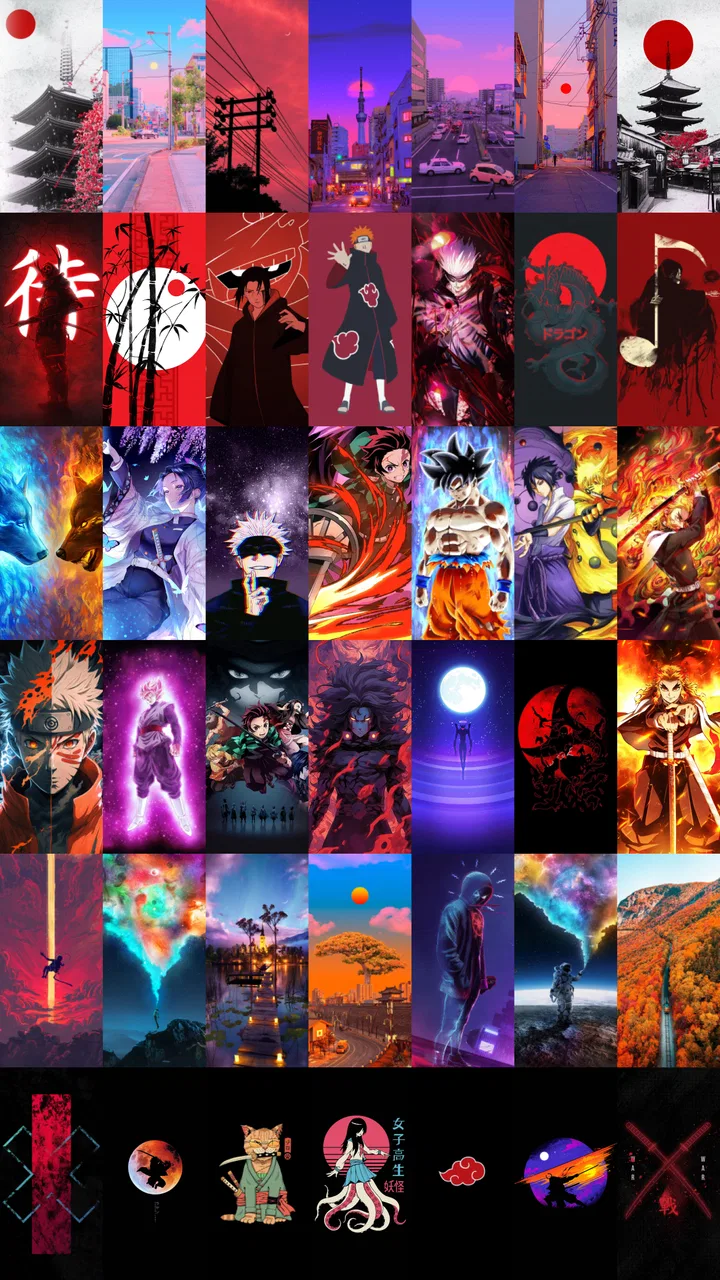
The central appeal is clear: Walli brings together a large collection of artistic backgrounds in one place, with an emphasis on striking visuals instead of plain color patterns or generic stock photography. It is free to install, developed by Tap AI, and available for users whose device runs Android 9 or newer. Its Teen content rating is worth noticing if the phone is used by a younger family member, since the app is not presented as a child-focused personalization tool.
How Walli feels when choosing a wallpaper
The first thing I noticed is that the browsing experience encourages discovery. Instead of starting with a blank editor and asking me to make an image from scratch, it puts the artwork first. That makes the app particularly comfortable when I know I want a fresh look but do not have a precise idea in mind. I can move from one visual style to another quickly, pause on something that catches my eye, and decide whether it suits my home screen or lock screen.
You May Also Like

 Blood Strike: 2.5 Anniversary
Blood Strike’s Loadouts Turn Every Drop Into a Tactical Gamble
A close look at Blood Strike’s custom loadouts: how fast access to signature weapons reshapes its battle royale rhythm, rewards preparation, and narrows the gap between fights.

 Pandora - Music & Podcasts
Pandora’s Music Is Easy to Start, but Harder to Recover
Pandora’s strength is its low-effort path from a seed to a station. Its weak spot is how much confidence it asks you to place in connection, setup, and quiet recovery.

 8 Ball Pool
 Is Built on Rivalries, Rematches, and Routine
A close look at the rivalries, rematches, shared routines, and unanswered safety questions that turn a quick pool match into a persistent mobile community.

 Samsung Music
’s Quiet Strength Is Playing What You Already Own
Its reach comes less from spectacle than from dependable access to a personal library. That simplicity is both the app’s strongest retention engine and its ceiling.

 AccuWeather: Weather Radar
AccuWeather Review: A Quick, Clear Forecast for Everyday Decisions
For everyday plans, the best forecast is the one you can understand quickly. AccuWeather makes rain timing, radar, and local conditions easy to act on, with a few trade-offs.

 Hill Climb Racing
Why Hill Climb Racing Still Turns Crashes Into One More Run
A tiny car, a bumpy hill and one more upgrade: Hill Climb Racing keeps resurfacing because its simple chaos makes every near-miss feel personal.
More From Our News Desk



That approach is different from using a search engine or a general image platform. With those options, I often have to think about resolution, cropping, licensing context, and whether an image will still look attractive once icons cover part of it. Walli is more focused on the wallpaper use case, so the decision feels less like collecting pictures and more like choosing the atmosphere of the phone.
The app’s store summary highlights 4K HD wallpapers and art backgrounds, and that gives a good sense of its visual ambition. I would not treat the resolution label as a guarantee that every individual image will look equally sharp on every screen, though. Display proportions vary widely, and a background that looks excellent in a preview may need cropping on a taller or wider phone. The practical lesson is to judge the composition, not just the resolution label.
For a busy lock screen, I found that minimal artwork can be more useful than the most detailed illustration. A strong central subject may end up hidden behind the clock, while a quieter image with open space near the top remains readable. This is one of the less obvious advantages of browsing a dedicated wallpaper collection: I can evaluate the image as a phone background instead of admiring it only as standalone art.
What the free experience means
Walli is listed as free, which makes it easy to try without committing money first. That matters because wallpaper preference is personal. An app can have beautiful images and still not match my taste, screen shape, or daily habits. Free access lowers the risk of installing it simply to explore the collection.
There are also in-app purchases, with individual items ranging from $0.99 to $29.99. I see that as a reason to separate two questions: whether the app is useful at no cost, and whether a paid option is worthwhile for a particular user. The free entry point gives Walli a reasonable value proposition for casual browsing, while the higher end of the purchase range means I would look carefully at what I was buying before confirming anything.
I would not install it assuming that every attractive background or every convenient option must be included without conditions. The sensible workflow is to browse first, use the free experience for a few days, and only then decide whether a purchase adds enough value. Since the app can already serve as a source of new wallpapers without an upfront price, there is no need to rush that decision.
This is also where Walli differs from downloading a wallpaper from a general web search. Search engines may offer more variety and can be completely free, but they make me do more filtering. Walli’s value is partly the time it saves: I am looking in a space designed for backgrounds rather than sorting through unrelated images, questionable crops, or results that are awkward to save and apply.
Where the collection is most useful
I think the strongest use case is a phone that feels visually stale. When I have used the same background for months, I do not necessarily want a complete redesign or a complicated customization system. I just want a new image that feels intentional. Walli makes that small change straightforward, and the artistic focus gives the phone a more personal character than a standard manufacturer wallpaper.
It is also useful for people who want their home and lock screens to feel coordinated. I can choose a bold image for the lock screen, then look for a calmer companion for the home screen so app icons remain easy to recognize. That pairing is more practical than applying the most dramatic image everywhere. The best result often comes from treating the two screens differently rather than forcing one picture to do both jobs.
Another worthwhile habit is to save a small rotation of backgrounds rather than changing the wallpaper every time I see something interesting. I can keep one image for workdays, another for travel, and a quieter choice for periods when I need fewer distractions. Walli works well as a source for that rotation because the browsing process encourages me to notice different moods and styles.
The app can also help someone who wants a more distinctive phone without learning graphic design. I do not need to create a collage, adjust layers, or find suitable artwork elsewhere. I can start with an illustration that already has a finished visual identity. That convenience is the real benefit, especially for users who care about appearance but do not want personalization to become a project.
Small decisions that improve the result
My first practical tip is to preview an image with the phone’s icons and clock in mind. A beautiful composition is not automatically a good wallpaper. Look for where the main subject sits, whether the brightest area competes with text, and whether the background has enough visual calm behind frequently used icons. This avoids the common disappointment of choosing an image that looks impressive in the gallery but messy on the actual screen.
My second tip is to search by mood rather than by color alone. A blue image can be peaceful, cold, energetic, or dramatic depending on its shapes and contrast. Thinking about how I want the phone to feel helps me make a better choice than simply matching a case or widget. This is especially helpful when the collection presents many attractive options that might otherwise blur together.
Third, I would change the wallpaper after checking the crop on the device, not only in the app’s preview. Screen ratios are different, and the crop can remove the detail that made the image appealing. If the important subject sits close to an edge, I would choose another background with more breathing room. That trade-off is easy to miss when browsing quickly.
A fourth useful approach is to choose artwork around the way I use the phone. If I check messages constantly, a highly detailed background may become tiring. If the phone is mostly used for occasional calls and photos, a more expressive image may be enjoyable. Walli offers more value when I treat the wallpaper as part of daily usability, not just decoration.
Strengths, friction, and the people it suits
Walli’s biggest strength is focus. It is not trying to be a full launcher, icon pack manager, or design editor in the way some personalization suites are. That narrower purpose makes it approachable. I can open it with a simple goal, browse visual work, and leave with a different-looking phone without learning a complicated system.
The artwork-led presentation is also more inspiring than a directory of plain backgrounds. For me, the difference is important: I am not merely filling a screen; I am choosing an image with a style. That makes the app attractive to users who like illustration, digital art, unusual compositions, and wallpapers that feel less generic than the default options supplied with a phone.
Its public reception suggests that many people find this approach worthwhile. Walli has an average rating of 4.5 from around 889,000 ratings, and it has passed 10 million installs. Those figures do not prove that it will match every person’s taste, but they do indicate that the app has reached a substantial audience and maintained a strong overall response.
The trade-offs become clearer when I compare it with alternatives. A phone’s built-in wallpaper picker is faster when I only want a basic background and do not want another app. A general image search offers broader subject matter, while a design app is better if I want to create a custom wallpaper using my own photographs, text, or graphics. Walli sits between those choices: more curated and art-oriented than the default picker, more convenient than searching manually, but less flexible than making everything myself.
That middle position is both its appeal and its limit. If I want a specific family photo, a precise quote, or a background matched to an exact widget layout, Walli is not the best tool. I would use an editor or a gallery app instead. Likewise, someone who changes wallpapers rarely may find the built-in phone options sufficient and see little reason to add a dedicated catalog.
The purchase model deserves careful attention. Free access makes experimentation easy, but in-app purchases mean that not every part of the experience should be assumed to have the same value or availability. I would judge any paid choice by how often I expect to use the artwork and whether it offers something meaningfully better than the free selection. For a person who changes a wallpaper once a year, paying may be hard to justify. For someone who enjoys refreshing the phone regularly, a purchase could make more sense if the specific content appeals to them.
I also recommend remembering that a high-resolution background can affect the overall feel of a phone without improving its practical performance. Walli changes appearance, not the underlying speed, battery behavior, or organization of the device. Anyone looking for a faster interface, better notifications, or a new arrangement of apps should choose a different type of personalization tool. This app is about visual identity, and it should be evaluated on that basis.
Who should install it
I would recommend Walli to someone who gets bored with default wallpapers, enjoys discovering digital artwork, and wants a quick way to make a phone feel more personal. It is especially suitable for users who prefer selecting finished designs over creating their own. The free starting point also makes it a low-pressure option for testing whether an art-focused wallpaper catalog fits a particular taste.
It is a good match for a person who wants to refresh a device before a new routine, trip, school term, or work project. A carefully chosen background can make the phone feel new without requiring a new launcher or a complete rearrangement. For example, before a busy week, I might choose a simple background with low contrast so the home screen stays readable. On a quieter weekend, I could switch to something more colorful and expressive.
I would be more cautious about recommending it to users who want absolute control. If you need to crop every detail manually, combine several photos, add typography, or maintain a strict visual system across icons and widgets, a dedicated design or launcher solution will be more appropriate. Walli is strongest when the artwork itself is the starting point and the user is happy to make a selection rather than build the entire result.
Families should also pay attention to the Teen rating before installing it on a younger user’s device. That rating does not make the app unsuitable for every teenager, but it does mean I would not treat it as automatically appropriate for children. The decision should fit the age and supervision expectations of the person using the phone.
Version, platform, and everyday practicality
The current version is 2.12.90, and the listed minimum operating system is Android 9. That gives potential users a simple compatibility check before downloading: older Android devices may not be eligible, while a phone running Android 9 or later meets the stated baseline. I would still consider the age and general capability of the device when judging how comfortable browsing and applying backgrounds will feel.
The app was released on June 9, 2016, so it is not a brand-new experiment in the personalization space. In my view, that history helps explain why it feels like a focused destination rather than a temporary novelty. The important question is not its age by itself, but whether its art collection and browsing style still suit the way I want to customize my phone today.
One everyday scenario captures the app’s value well. Imagine unlocking the phone during a commute and realizing the current background has become visual noise. Instead of spending the evening searching the web, I can open Walli, browse several artistic directions, and look for an image with open space behind the clock and icons. I can then test the crop, keep the choice if it works, and return later when I want a different mood. That is a small task, but the app makes it feel more deliberate and less frustrating.
My final judgement is positive, with a clear boundary. Walli is worth trying when the goal is attractive, art-led wallpaper discovery rather than complete device redesign. Its free availability gives it a sensible entry point, while the in-app purchase range means I would remain selective about spending and would never assume that a paid option is necessary for casual use.
I would install it on a compatible Android phone if I wanted more character than the default wallpaper picker provides. I would skip it if I mainly need custom photo editing, advanced launcher controls, or a completely free experience with no purchase decisions at all. For the right user, though, it turns an overlooked part of the phone into an easy creative choice. That focused role, rather than the promise of changing every aspect of the interface, is what makes Walli a useful personalization app.
FAQs for Walli - Stunning 4K Wallpapers
01What makes Walli different from other wallpaper apps?
Walli stands out due to its curated collection of high-quality, unique 4K wallpapers created by a diverse community of artists. Unlike generic wallpaper apps, Walli offers a platform where artists can showcase their work, ensuring each wallpaper is both visually stunning and original. This artistic collaboration provides users with a personalized and refreshing experience.
02Is Walli free to use, or are there any in-app purchases?
Walli is free to download and use, offering a wide range of wallpapers at no cost. However, it does include optional in-app purchases. These purchases may provide additional features, exclusive wallpapers, or the ability to support your favorite artists, enhancing your overall experience without mandatory payments.
03How often is the wallpaper collection updated in Walli?
The wallpaper collection in Walli is regularly updated with new artworks from its community of artists. Users can expect frequent updates, ensuring access to the latest and most creative designs. This continuous refresh keeps your device’s appearance dynamic and aligned with current trends and new artistic expressions.
04Can I contribute my own artwork to Walli's collection?
Yes, Walli welcomes artists to contribute their work to its platform. If you're an artist looking to showcase your creations, you can apply to join the community. Walli provides an excellent opportunity for artists to reach a wider audience and gain recognition while potentially earning from their artwork.
05Does Walli consume a lot of data or battery power?
Walli is designed to be efficient, but like any app that handles high-resolution images, it can use data when downloading wallpapers. It’s advisable to use Wi-Fi for downloading large files to minimize data usage. Battery consumption is minimal, as the app mainly operates when actively browsing or downloading wallpapers.
Pros
- Huge collection of unique 4K wallpapers.
- User-friendly interface with smooth navigation.
- Regular updates with fresh content.
- Option to create a personalized favorite list.
- Wallpapers optimized for battery usage.
Cons
- Contains in-app ads that can be intrusive.
- Limited offline access to downloaded images.
- Some categories lack variety.
- Premium features require a subscription.
- Occasional slow loading of images.

Walli - Stunning 4K Wallpapers
Gallery